
+1 581-502-1115 Viesigners

Putting the Musée de la civilisation’s collections within everyone’s reach

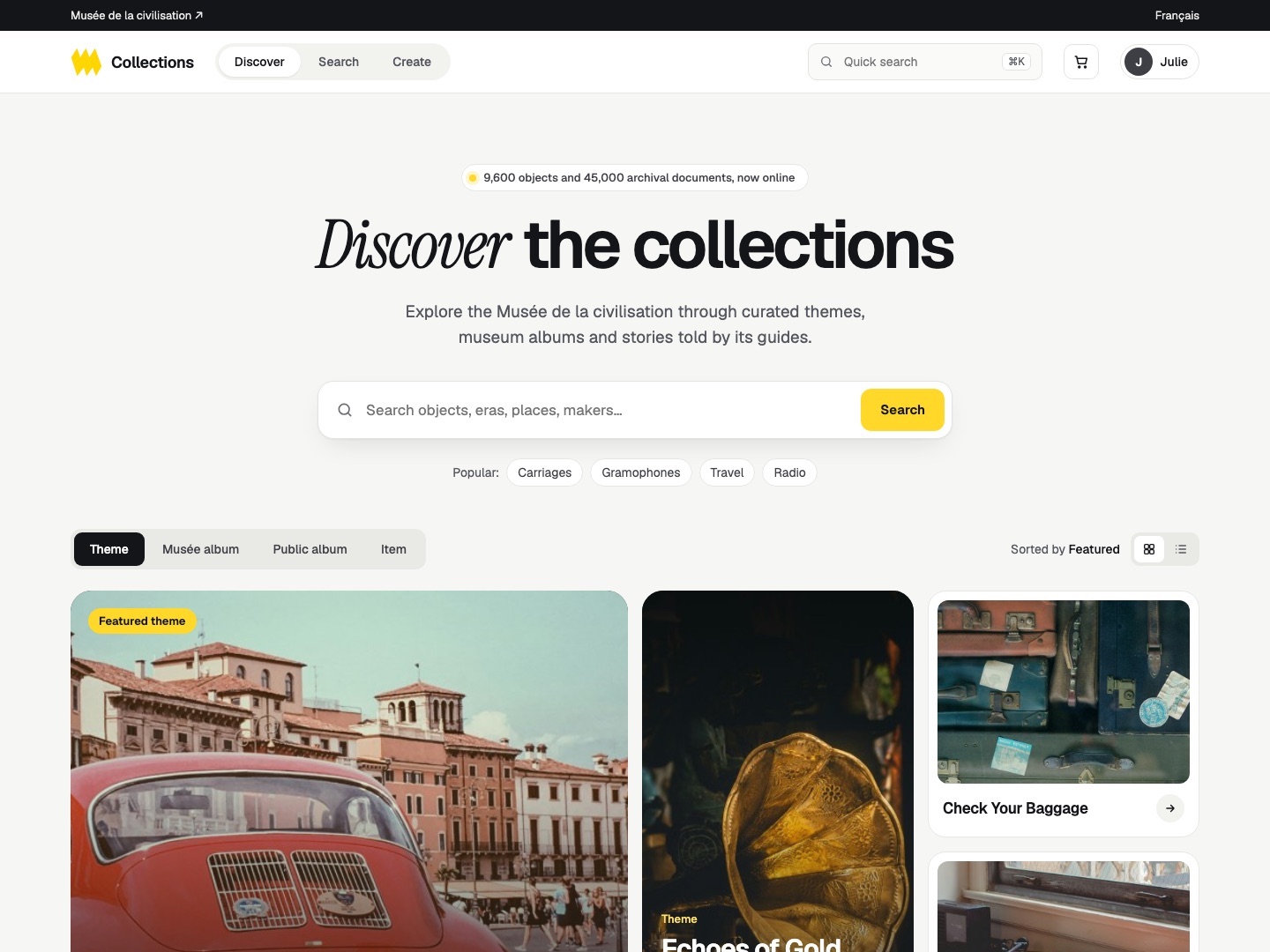
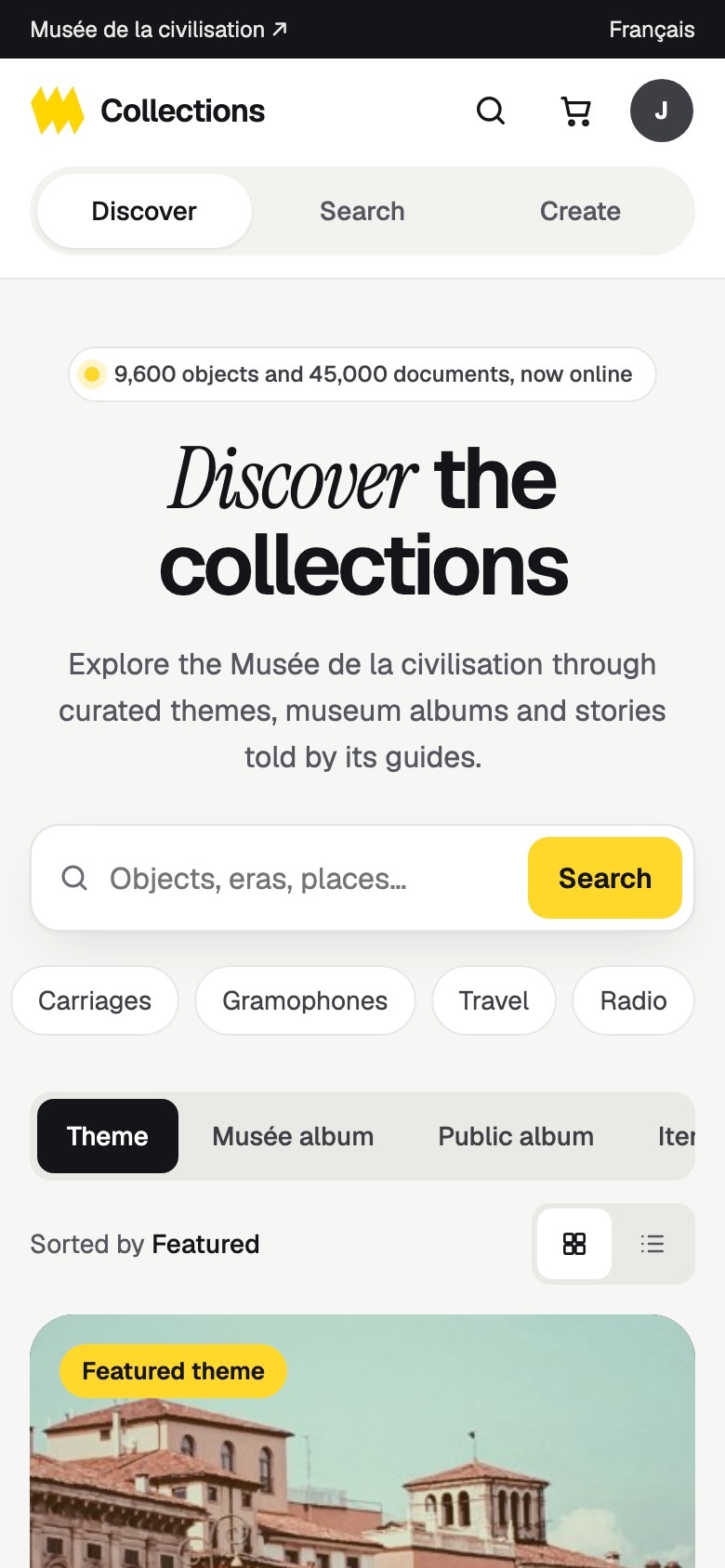
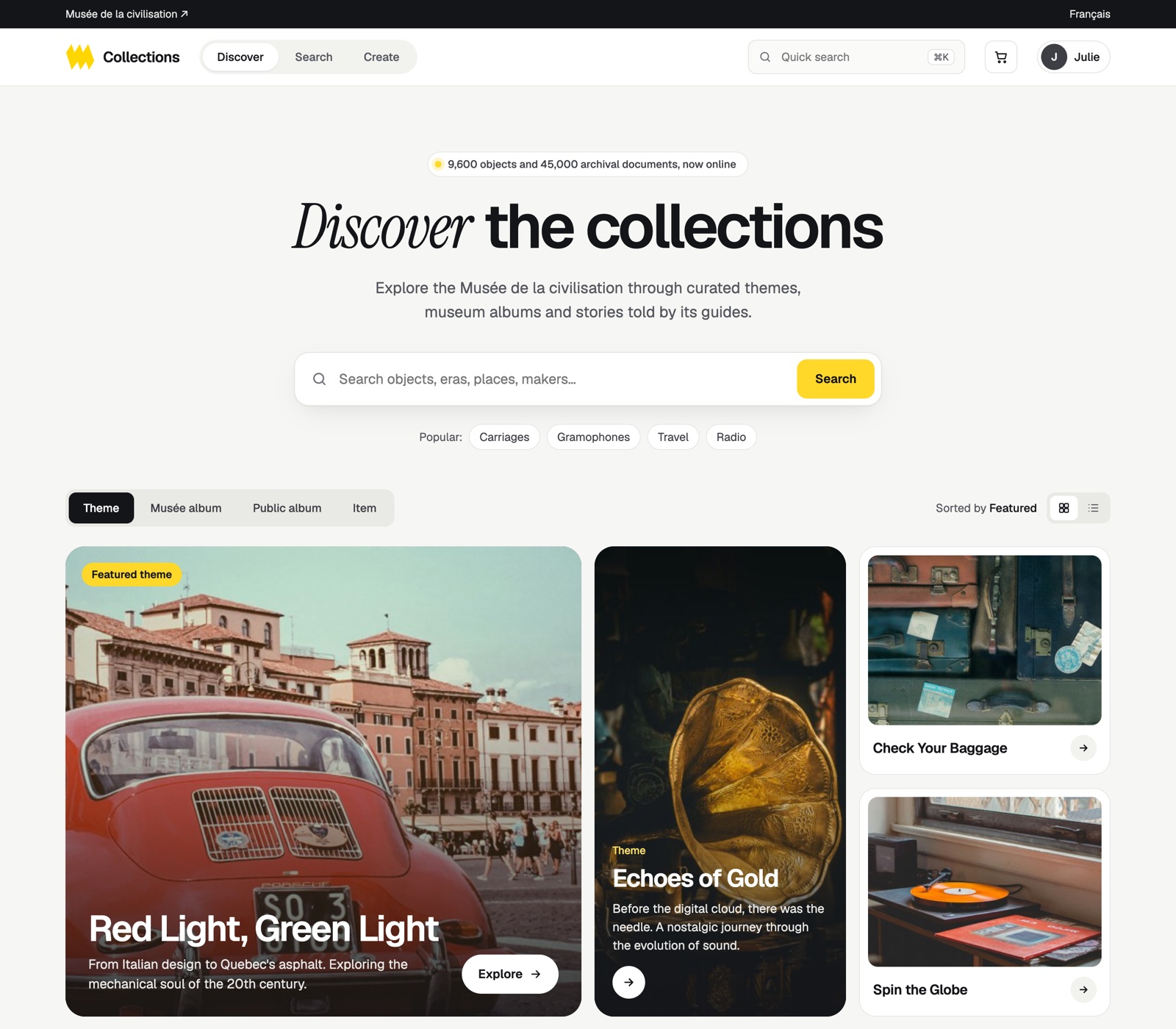
The Collections Discover page: a search across 9,600 objects and 45,000 archive documents, and featured themes

The Collections Discover page.

The Musée de la civilisation wanted an engaging, fluid experience that encourages people to discover its collections, play with them and contribute to them. It also wanted a clear view of the user journey within the app, to prioritize development over time. That’s what it hired us to guide.

Role
UX consulting and direction
Client
  • Museum
  • Culture
  • State society
Goals
  1. Give access
  2. Delight users
  3. Build relationships that foster mutual contribution
What I did
  • User research
  • Personas
  • User story mapping
  • User journey
  • Information architecture
  • Page structure
  • UX recommendations
  • Development prioritization
  • UX consulting
  • Graphic designI refreshed the look and feel of these screens myself for this case study. The original visual design may differ.
Worked with
  • Musée de la civilisation project lead
  • Musée de la civilisation development team
  • Art director
54,000+objects, archive documents and books to make easy to browse and useful to the public.
2user profiles, each with its own user story map.
Finalistat the OCTAS awards, Ministry and State Society category (4,000 employees and less).

The context

Give access, delight, build relationships

The Musée de la civilisation is a place of inquiry, study and documentation that seeks to understand and interpret the world. Its research activities make the institution a national reference.

Its collections are kept in two different storage facilities. For this project, more than 9,600 objects and 45,000 archive documents and books were to be digitized and presented online for the public to consult, inspect and virtually play with. How the objects would be presented, and how people would interact with them, was not clearly defined yet.

The approach

Focusing on people first

Every app or website should start with the target audience in mind.

With the museum team, we developed two main user profiles with different backgrounds and needs: Nicole, an amateur researcher, and Jérôme, a member of the general public. Together, we then created a sequential user story map for each one, aimed at deepening their relationship with the museum along the way.

This let the museum team clearly see what mattered most, and what could come in later development phases without losing people’s interest.

Silhouette of Nicole

Nicole

Amateur researcher

Age
58
Background
Retired teacher, passionate about local history and genealogy
Device
Desktop, long sessions
Digital comfort
High

When I find an object, I want to know everything: where it comes from, who made it, and whether I can reuse its image.

Goals

  • Quickly find precise information about an object
  • Browse complete records and related objects
  • Understand what she’s allowed to do with the images
  • Share her knowledge and contribute to the collections

Frustrations

  • Searches that return too many results, with no filters
  • Incomplete records with no sources
  • Not knowing why an object isn’t online

Habits

  • Often arrives from a Google search
  • Takes notes and keeps favourites
  • Swaps findings in history and genealogy groups

What she needs

  • Advanced search and filters
  • Detailed records with clear usage rights
  • Ways to contribute, and to be recognized for it

Silhouette of Jérôme

Jérôme

Member of the general public

Age
34
Background
Working parent who visits the museum once or twice a year
Device
Phone, short evening sessions
Digital comfort
Medium to high

I don’t know what I’m looking for, but show me something that surprises me.

Goals

  • Satisfy his curiosity, effortlessly
  • Discover the stories behind the objects
  • Share his finds with friends and family

Frustrations

  • Dry catalogues built for specialists
  • Too much text at once
  • Not knowing where to start

Habits

  • Discovers content through social media and ads
  • Browses on his phone, between two tasks
  • Likes and shares what makes him smile

What he needs

  • Albums and stories that are easy to browse
  • Suggestions to keep exploring
  • A newsletter that makes him want to come back

User story mapping

Two journeys, step by step

ActivityTaskUser story

Jérôme member of the general public

  1. 01Interest in content

    • Seeing an ad

      • I want to See MCQ ads

        so that I can hear about interesting content in the online collections

  2. 02Exploration

    • Exploring

      • I want to Explore the available albums

        so that I can satisfy my curiosity

      • I want to Explore the albums in a category

        so that I can discover content related to the category I’m interested in

      • I want to Explore the available themes and stories

        so that I can discover stories about topics I care about

  3. 03Browsing

    • Browsing object groupings

      • I want to Read stories that tell the history of the objects they group

        so that I can discover interesting historical facts about objects in the collections

      • I want to Browse collections of objects on one theme

        so that I can discover the beauty of the objects

    • Browsing related groupings

      • I want to Read other stories related to what I just read

        so that I can deepen my knowledge of a topic that speaks to me

      • I want to Browse collections on other themes

        so that I can discover objects I wouldn’t have thought of

  4. 04Building a relationship

    • Receiving interesting content

      • I want to Sign up for an email list

        so that I can get interesting stories in my inbox

      • I want to Sign up for platform updates

        so that I can hear about new features

      • I want to Follow the MCQ on social media

        so that I can get content prepared by the team in my feeds

  5. 05Social interactions

    • Giving feedback

      • I want to Say that I like a story or an album

        so that I can influence the content the MCQ puts forward

    • Sharing

      • I want to Share the stories and albums I like

        so that I can let people in my network who might be interested know

Nicole amateur researcher

  1. 01Interest in content

    • Seeing a specific topic

      • I want to Find the object I’m interested in through a web search

        so that I can find information that adds to what I already know

  2. 02Search

    • Searching a specific topic

      • I want to Run a keyword search

        so that I can quickly find information on a topic

      • I want to Run an advanced search

        so that I can find specific information

      • I want to See the list of my results

        so that I can tell whether a result matches what I’m looking for

  3. 03Browsing

    • Viewing an object’s details

      • I want to View object records

        so that I can learn more about their history and features

    • Viewing related objects

      • I want to View records related to the object I just saw

        so that I can deepen my knowledge of a topic that speaks to me

    • Checking rights and restrictions

      • I want to Know the terms of use and rights attached to the images

        so that I can understand what use is allowed

      • I want to Know the restrictions on some images and objects

        so that I can understand why they aren’t available online

  4. 04Social interactions

    • Sharing a record

      • I want to Share the object records I find interesting

        so that I can let people in my network who might be interested know

    • Giving feedback

      • I want to Say that an object interests me or that I like it

        so that I can influence the content the MCQ puts forward

  5. 05Contribution

    • Correcting and enriching content

      • I want to Become a contributor

        so that I can contribute to a field I care about

      • I want to Suggest an addition or a change

        so that I can put my knowledge to use

    • Reporting abuse or an error

      • I want to Report abuse I’ve seen to the MCQ

        so that I can help keep the content I use accurate

    • Documenters’ club

      • I want to Be named a super documenter

        so that I can want to keep contributing

      • I want to Have my contribution recognized

        so that I can feel that I matter to the MCQ

    • Offering an object

      • I want to Offer objects I own as a donation

        so that I can enrich the MCQ’s collections

    • Donating

      • I want to Make a financial donation

        so that I can support culture and the MCQ’s reach

      • I want to Fund a project tied to my interests (restoration, digitization, acquisition, exhibition)

        so that I can support culture and the MCQ’s reach

      • I want to Sponsor an object

        so that I can secure an object’s future (documentation, conservation, restoration)

The solution

Choices that make people want to explore

Logically structured information drawers

They use cookies to remember the last chunks of information displayed, to tailor the experience to the needs and context of most users.

Related content

To encourage discovery, learning and engagement.

Flexible templates

Media and text templates that give content creators flexibility while keeping a consistent, appealing look and feel.

The screens

The app in pictures

Home page: search, featured themes and albums, and suggestions to keep exploring
Discover
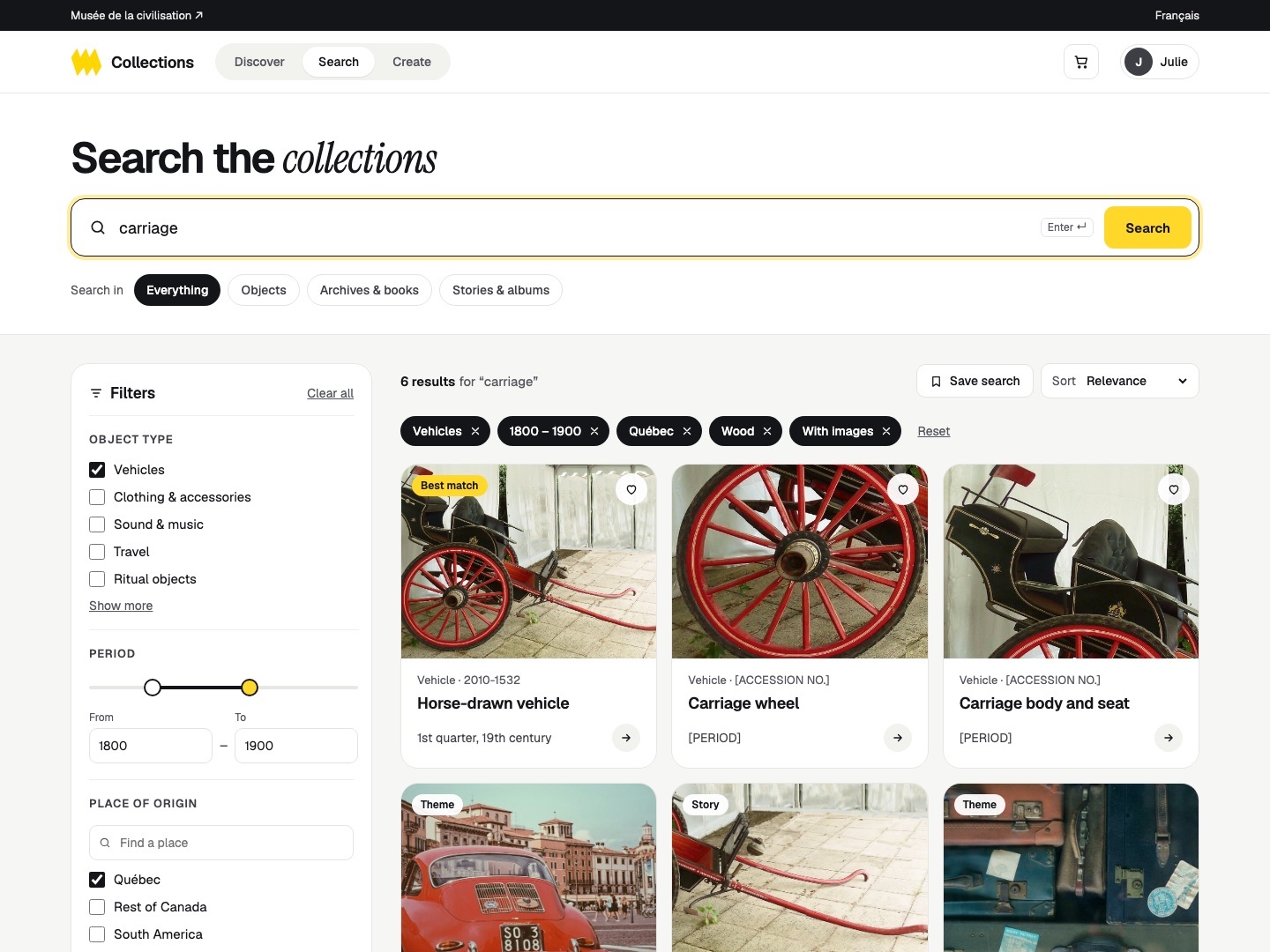
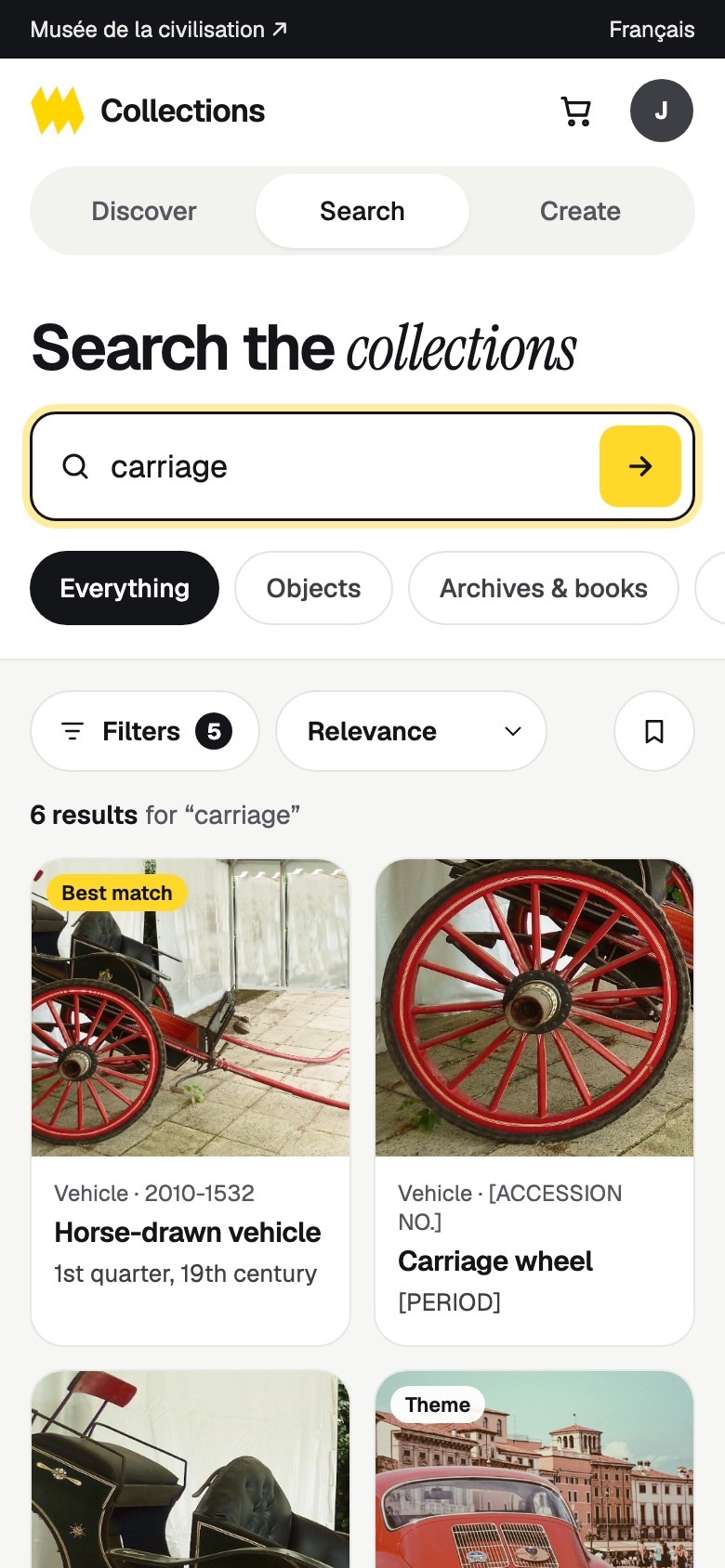
Search with filters by object type, period, place of origin and material
Search
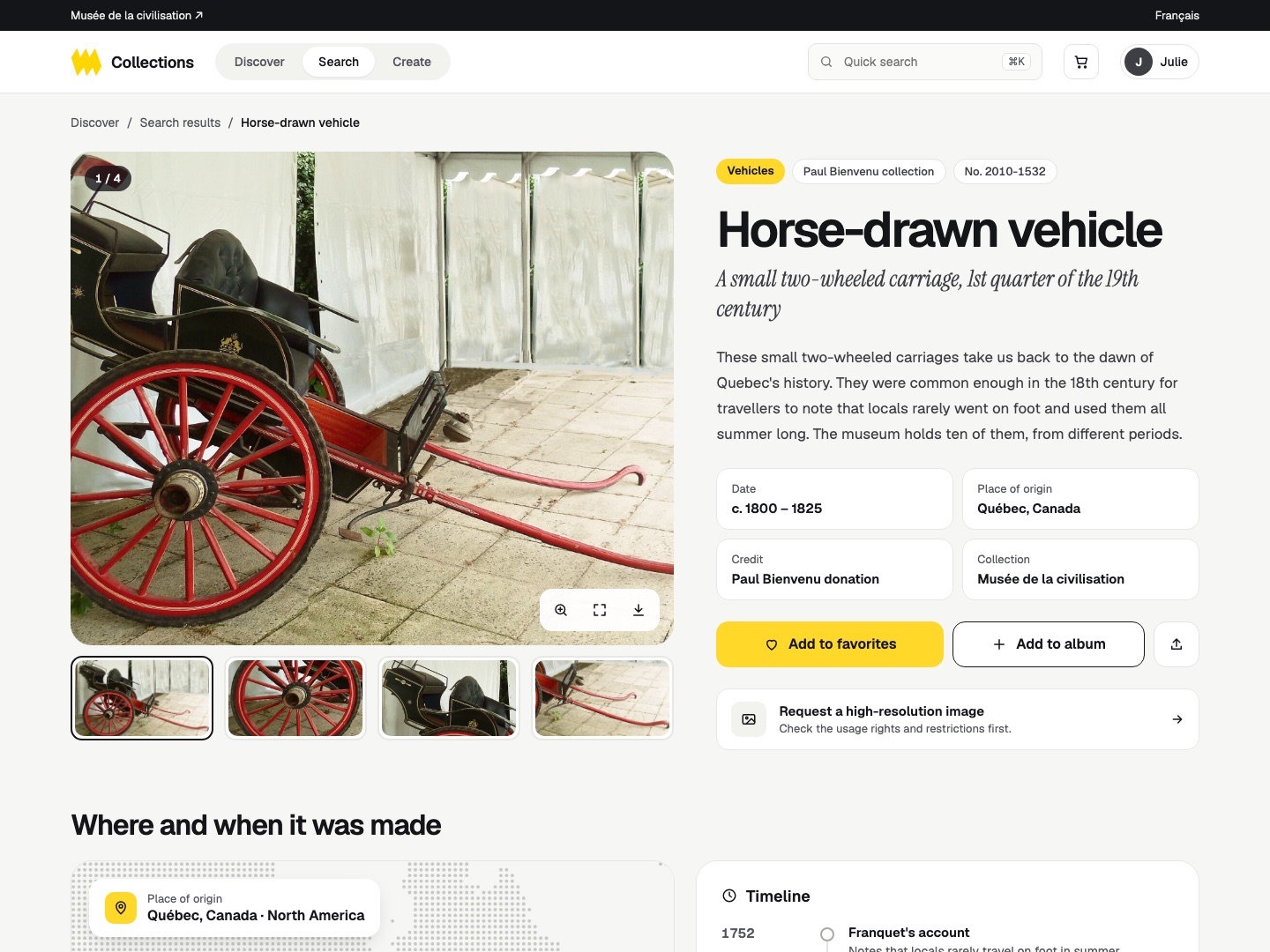
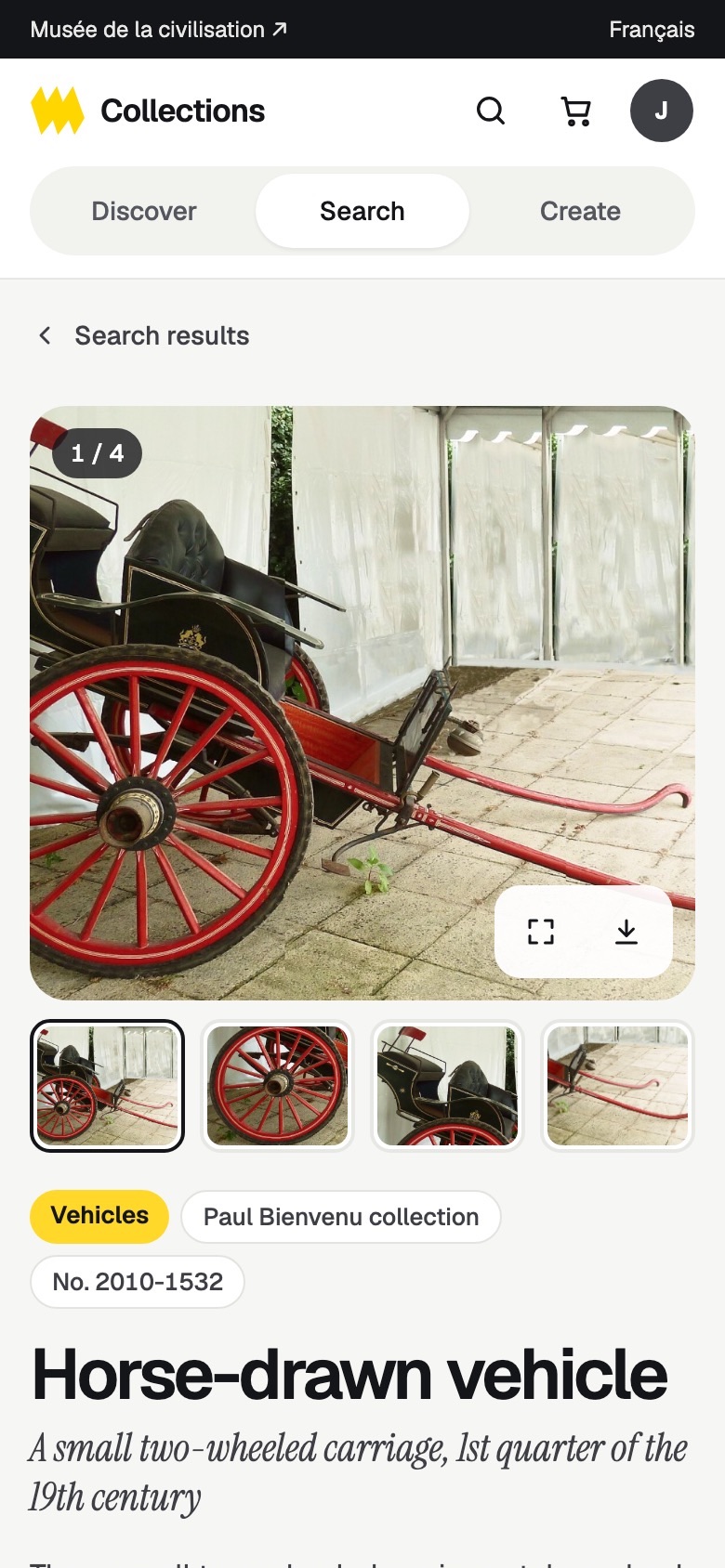
An object record: gallery, map of origin, timeline, expandable sections and related content
Object record
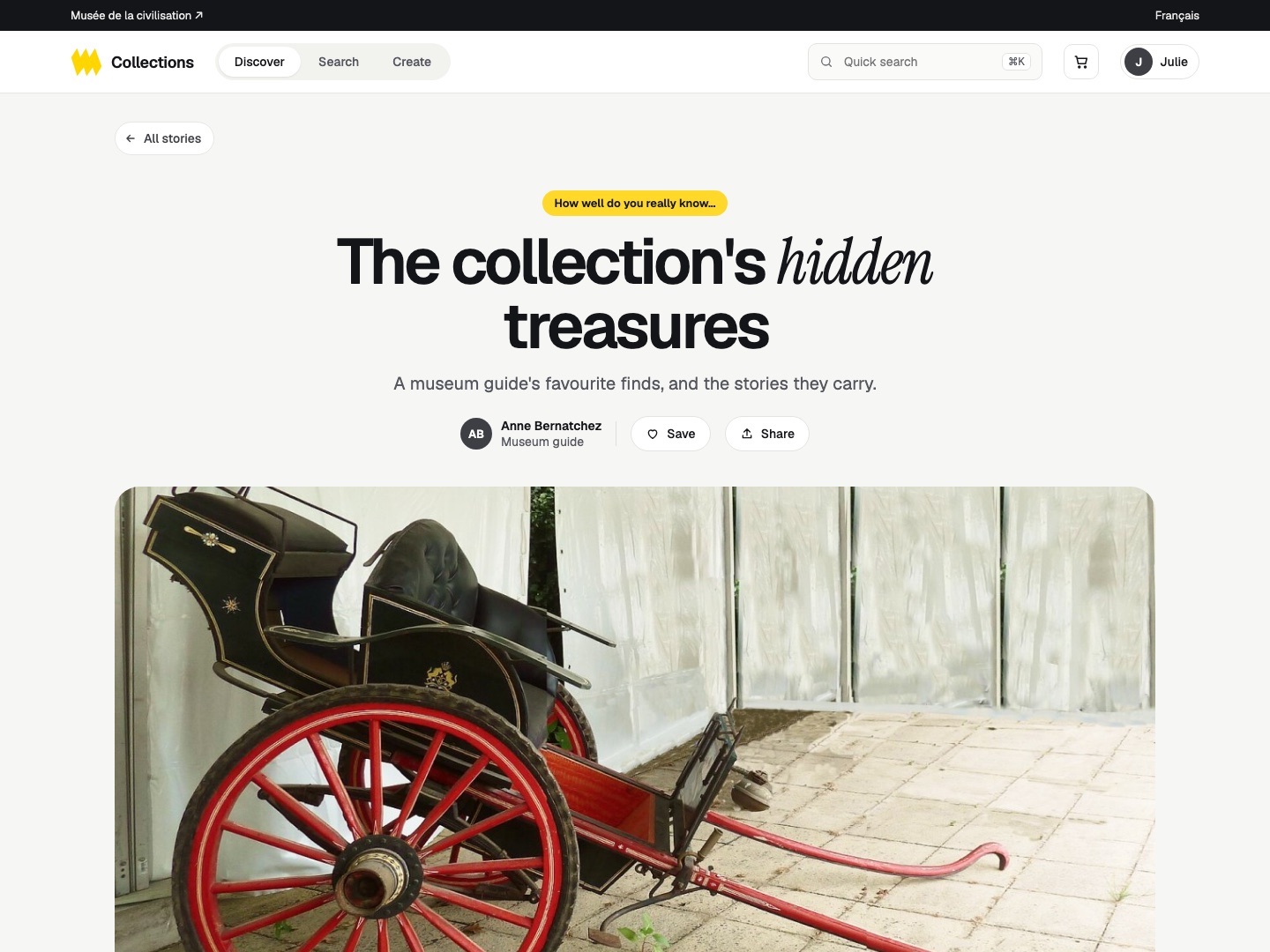
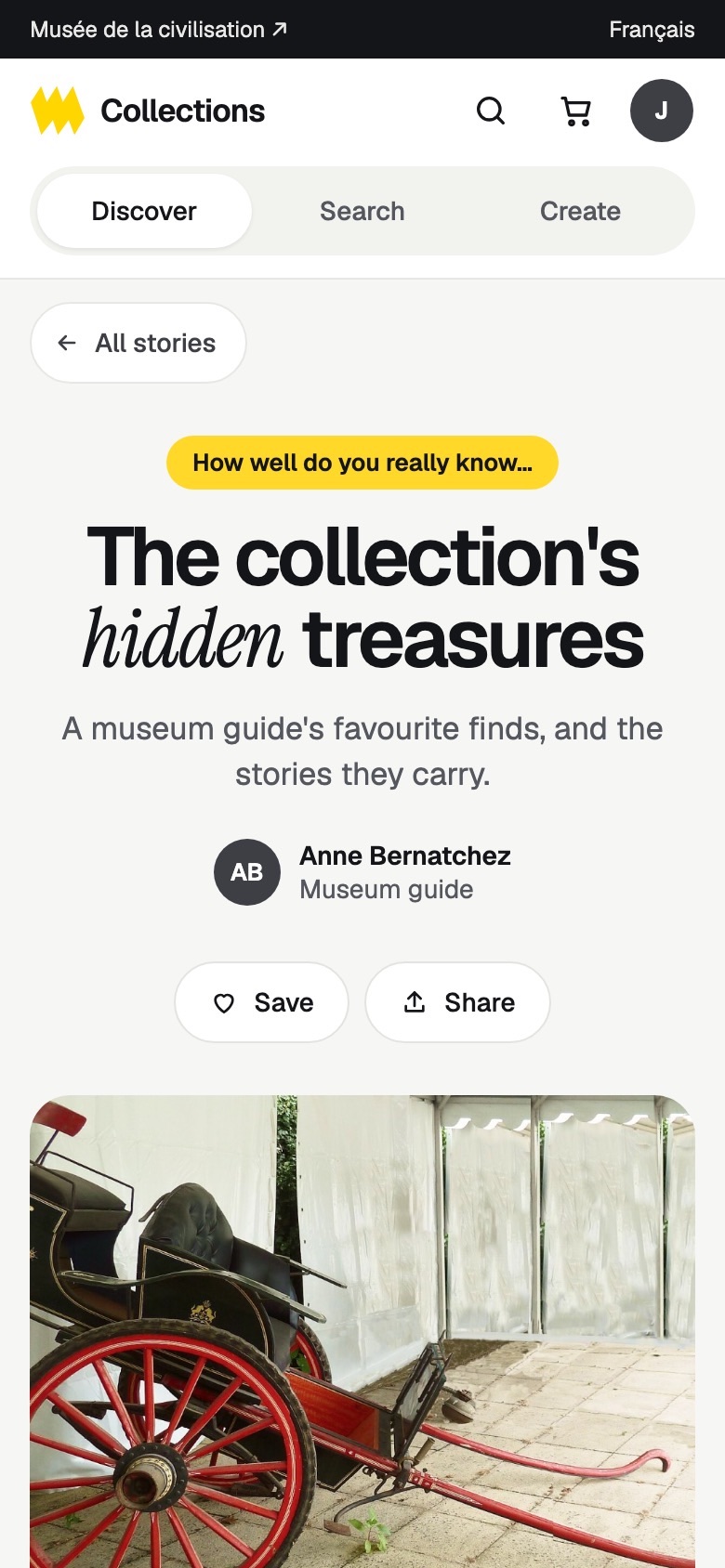
A museum guide’s story, with the featured object and chapters to browse
Story

On mobile

Same experience, in your pocket

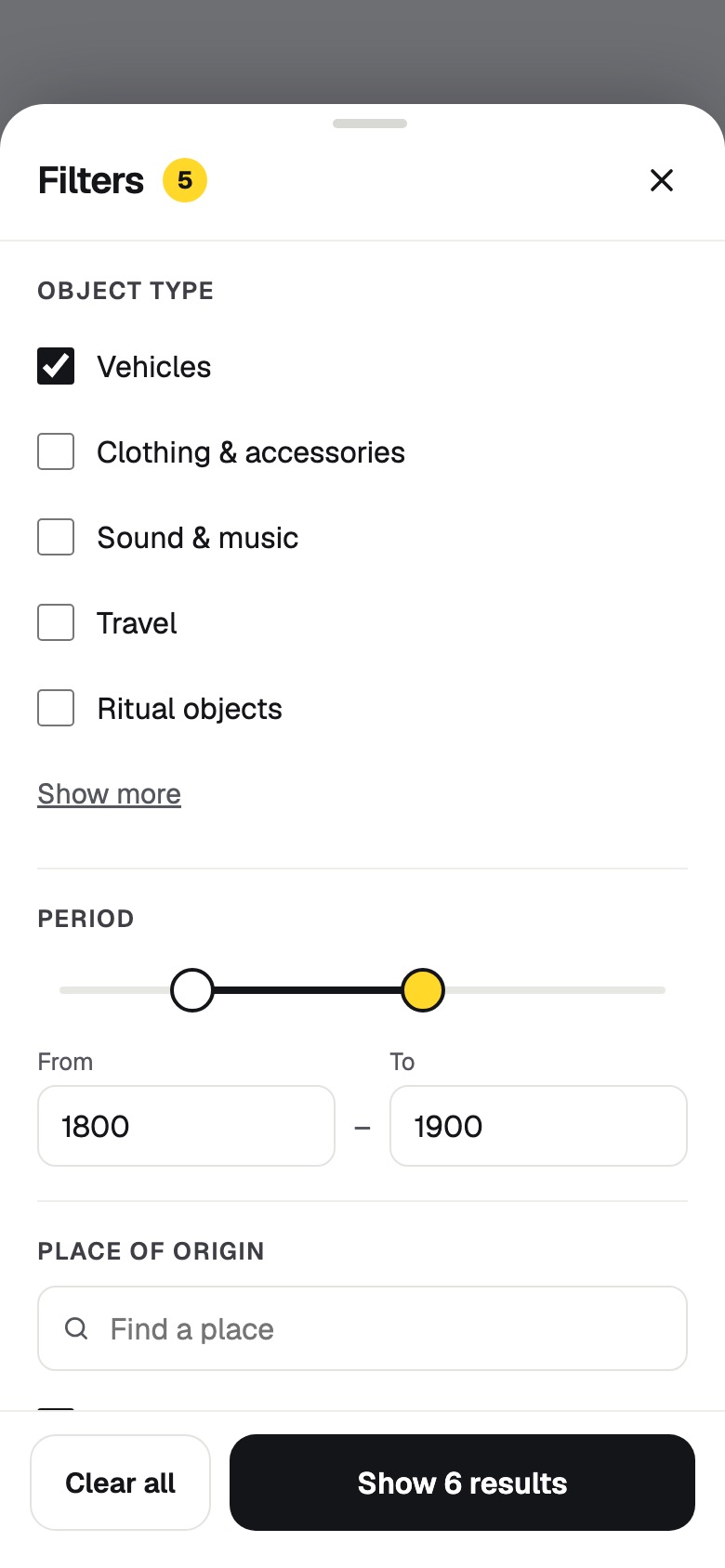
Mobile and desktop were designed in parallel, for a great experience on every device: filters slide up in a sheet, results switch to two columns, and every touch target is at least 44 px.

Mobile home page: search, featured themes and albums
Discover
Mobile search results in two columns, with a Filters button
Search
Filters in a sheet that slides up: object type, period, place of origin and material
Filters
Mobile object record: photo gallery, key details, map of origin and timeline
Object record
Mobile story: the museum guide’s introduction, a quote and the featured object
Story

Recognition

Great UX gets noticed

The Collections web app was an OCTAS award finalist in the Ministry and State Society category (4,000 employees and less), solidifying the Musée de la civilisation’s position as a creative, original institution that keeps pushing limits.

FinalistOCTASMinistry and State Society category (4,000 employees and less)

Need a hand launching a platform people want to explore?

You’re in the right place!